
Snippet YAML : Affichage du jour style calendrier
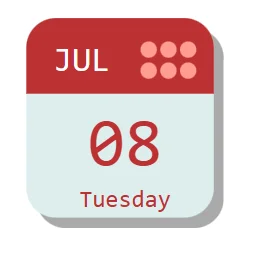
Affiche une date à la manière d’un calendrier à feuillet détachables.
Les couleurs s’adaptent au thème moderne de l’application
L’image est responsive et s’adapte au ratio hauteur largeur du contrôle
Il est possible de changer dans le With() :
La date par défaut (_date)
De forcer le format régionnal utilisé (_lang)
Voir le code
- ImageDay:
    Control: Image@2.2.3
    Properties:
      Height: =322
      Image: |-
        =With({_date : Today(), _lang:Language()},
        "data:image/svg+xml;utf8, "& EncodeUrl($"<svg onload='w()' xmlns='http://www.w3.org/2000/svg' xmlns:xlink='http://www.w3.org/1999/xlink'
        aria-label='Calendar' role='img'
        viewBox='0 0 {Trunc(Self.Width,0)} {Trunc(Self.Height,0)}'
        style='font-family:monospace;text-anchor:middle;fill:#677'>
        <defs>

        <clipPath id='c'>

        <rect
        width='95%' height='95%'
        rx='15%'/>

        </clipPath>

        </defs>
        <rect
        width='95%' height='95%' x='5%' y='5%' fill='#aaaaaa'
        rx='15%'/>
        <g clip-path='url(#c)'>

        <rect
        width='95%' height='95%'
        fill='#dee'/>

        <rect
        width='95%' height='36%'
        fill='{Mid(JSON(App.Theme.Colors.Primary),2,7)}'/>

        </g>

        <g id='b'>

        <circle fill='{Mid(JSON(App.Theme.Colors.Lighter50),2,7)}' cx='62%' cy='15%' r='4%' id='a'/>

        <use x='10%' xlink:href='#a'/>

        <use x='20%' xlink:href='#a'/>

        </g>

        <use y='10%' xlink:href='#b'/>

        <text fill='{Mid(JSON(App.Theme.Colors.Primary),2,7)}' font-size='280%' x='50%' y='90%' id='w'>{Text(_date,"dddd",_lang)}</text>

        <text fill='#ffffff' font-size='400%' x='28%' y='25%' id='m'>{Upper(Text(_date,"mmm",_lang))}</text>

        <text fill='{Mid(JSON(App.Theme.Colors.Primary),2,7)}' font-size='800%' x='50%' y='70%' id='d'>{Text(Day(_date),"00")}</text>

        </svg>")
        )
      PaddingBottom: =10
      PaddingLeft: =10
      PaddingRight: =10
      PaddingTop: =10
      Width: =302
      X: =952
      Y: =376
Ce snippet fait partie de la collection Snippets YAML. Retrouvez tous les snippets avec le tag Snippet.


Échanger autour de cet article
Les commentaires utilisent Giscus et GitHub Discussions. Le service externe n’est contacté qu’après activation.