
Snippet YAML : Form Factor Selector
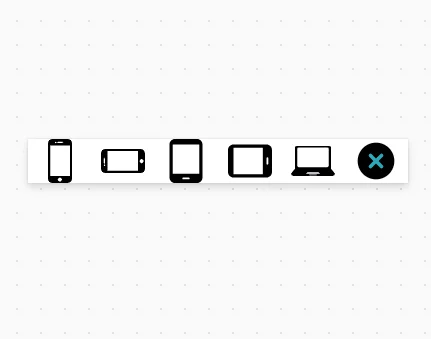
Permet de changer le “form factor” dans l’éditeur, très utile pour construire des applications responsives
Voir le code
❗Attention, cela nécessite de remplacer pour chaque écran :
Syntaxe FR
Width :
            Max(App.Width; App.MinScreenWidth)

            par :
            Coalesce(vFormFactor.Width;Max(App.Width; App.MinScreenWidth))
    Height :
            Max(App.Height; App.MinScreenHeight)

            par :
            Coalesce(vFormFactor.Height;Max(App.Height; App.MinScreenHeight))

Syntaxe EN
Width :
            Max(App.Width, App.MinScreenWidth)

            par :
            Coalesce(vFormFactor.Width,Max(App.Width, App.MinScreenWidth))
    Height :
            Max(App.Height, App.MinScreenHeight)

            par :
            Coalesce(vFormFactor.Height,Max(App.Height, App.MinScreenHeight))
- FormFactorSelector_1:
    Control: Gallery@2.15.0
    Variant: Vertical
    Properties:
      ContentLanguage: ="" // Snippet Created by David ZOONEKYNDT - https://dz13n.wordpress.com/ - https://www.linkedin.com/in/david-zoonekyndt/
      Height: =44
      Items: |-
        =/*
        Put form factors un this table, put this table in a named formula if you wish to swap format from different screens
        Replace in every screen :
        Width :
                Max(App.Width, App.MinScreenWidth)

                by :
                Coalesce(vFormFactor.Width,Max(App.Width, App.MinScreenWidth))
        Height :
                Max(App.Height, App.MinScreenHeight)

                by :
                Coalesce(vFormFactor.Height,Max(App.Height, App.MinScreenHeight))
        */
        Table(
            {Index:1,Name:"Smartphone Portrait",Width:360,Height:800,Icon:$"<svg xmlns='http://www.w3.org/2000/svg' version='1.1' xmlns:xlink='http://www.w3.org/1999/xlink' width='512' height='512' x='0' y='0' viewBox='0 0 503.604 503.604' style='enable-background:new 0 0 512 512' xml:space='preserve' class=''><g><path d='M337.324 0H167.192c-28.924 0-53.5 23.584-53.5 52.5v398.664c0 28.916 24.056 52.44 52.98 52.44l170.412-.184c28.92 0 52.58-23.528 52.58-52.448l.248-398.5C389.908 23.452 366.364 0 337.324 0zM227.68 31.476h49.36c4.336 0 7.868 3.52 7.868 7.868 0 4.348-3.532 7.868-7.868 7.868h-49.36a7.865 7.865 0 0 1-7.868-7.868 7.865 7.865 0 0 1 7.868-7.868zm-29.66 2.504c2.916-2.912 8.224-2.952 11.136 0a7.973 7.973 0 0 1 2.324 5.588c0 2.048-.864 4.088-2.324 5.548-1.452 1.46-3.504 2.32-5.548 2.32-2.084 0-4.088-.86-5.588-2.32-1.452-1.456-2.28-3.5-2.28-5.548-.004-2.088.828-4.132 2.28-5.588zm52.752 454.028c-12.984 0-23.544-10.568-23.544-23.548 0-12.984 10.56-23.548 23.544-23.548s23.544 10.564 23.544 23.548c0 12.98-10.564 23.548-23.544 23.548zm114.716-63.1H141.232V74.756h224.256v350.152z' opacity='1' data-original='#000000' class=''></path></g></svg>"},

            {Index:2,Name:"Smartphone paysage",Width:800,Height:360,Icon:$"<svg xmlns='http://www.w3.org/2000/svg' version='1.1' xmlns:xlink='http://www.w3.org/1999/xlink' width='512' height='512' x='0' y='0' viewBox='0 0 503.604 503.604' style='enable-background:new 0 0 512 512' xml:space='preserve' class=''><g transform='matrix(6.123233995736766e-17,-1,1,6.123233995736766e-17,-0.0000152587890625,503.60398864746094)'><path d='M337.324 0H167.192c-28.924 0-53.5 23.584-53.5 52.5v398.664c0 28.916 24.056 52.44 52.98 52.44l170.412-.184c28.92 0 52.58-23.528 52.58-52.448l.248-398.5C389.908 23.452 366.364 0 337.324 0zM227.68 31.476h49.36c4.336 0 7.868 3.52 7.868 7.868 0 4.348-3.532 7.868-7.868 7.868h-49.36a7.865 7.865 0 0 1-7.868-7.868 7.865 7.865 0 0 1 7.868-7.868zm-29.66 2.504c2.916-2.912 8.224-2.952 11.136 0a7.973 7.973 0 0 1 2.324 5.588c0 2.048-.864 4.088-2.324 5.548-1.452 1.46-3.504 2.32-5.548 2.32-2.084 0-4.088-.86-5.588-2.32-1.452-1.456-2.28-3.5-2.28-5.548-.004-2.088.828-4.132 2.28-5.588zm52.752 454.028c-12.984 0-23.544-10.568-23.544-23.548 0-12.984 10.56-23.548 23.544-23.548s23.544 10.564 23.544 23.548c0 12.98-10.564 23.548-23.544 23.548zm114.716-63.1H141.232V74.756h224.256v350.152z' opacity='1' data-original='#000000' class=''></path></g></svg>"},

            {Index:3,Name:"Tablette Portrait",Width:800,Height:1280,Icon:$"<svg xmlns='http://www.w3.org/2000/svg' version='1.1' xmlns:xlink='http://www.w3.org/1999/xlink' width='512' height='512' x='0' y='0' viewBox='0 0 24 24' style='enable-background:new 0 0 512 512' xml:space='preserve' class=''><g><path d='M18 0H6C4.34 0 3 1.34 3 3v18c0 1.66 1.34 3 3 3h12c1.66 0 3-1.34 3-3V3c0-1.66-1.34-3-3-3zm-4.5 22h-3c-.28 0-.5-.22-.5-.5s.22-.5.5-.5h3c.28 0 .5.22.5.5s-.22.5-.5.5zm5.75-3H4.75V3h14.5z' opacity='1' data-original='#000000' class=''></path></g></svg>"},

            {Index:4,Name:"Tablette Paysage",Width:1280,Height:800,Icon:$"<svg xmlns='http://www.w3.org/2000/svg' version='1.1' xmlns:xlink='http://www.w3.org/1999/xlink' width='512' height='512' x='0' y='0' viewBox='0 0 24 24' style='enable-background:new 0 0 512 512' xml:space='preserve' class=''><g transform='matrix(6.123233995736766e-17,-1,1,6.123233995736766e-17,0,24)'><path d='M18 0H6C4.34 0 3 1.34 3 3v18c0 1.66 1.34 3 3 3h12c1.66 0 3-1.34 3-3V3c0-1.66-1.34-3-3-3zm-4.5 22h-3c-.28 0-.5-.22-.5-.5s.22-.5.5-.5h3c.28 0 .5.22.5.5s-.22.5-.5.5zm5.75-3H4.75V3h14.5z' opacity='1' data-original='#000000' class=''></path></g></svg>"},

            {Index:5,Name:"Laptop",Width:1920,Height:1080,Icon:"<svg xmlns='http://www.w3.org/2000/svg' version='1.1' xmlns:xlink='http://www.w3.org/1999/xlink' width='512' height='512' x='0' y='0' viewBox='0 0 85.356 85.356' style='enable-background:new 0 0 512 512' xml:space='preserve' class=''><g><path d='M77.45 57.695V16.599a3.17 3.17 0 0 0-3.16-3.16H11.066a3.169 3.169 0 0 0-3.164 3.16V57.695L0 67.179a4.742 4.742 0 0 0 4.742 4.738h75.872a4.745 4.745 0 0 0 4.742-4.738l-7.906-9.484zM49.005 70.342H36.358a.789.789 0 0 1-.791-.791c0-.44.354-.791.791-.791h12.648c.433 0 .791.351.791.791a.8.8 0 0 1-.792.791zm-19.358-3.16 2.412-2.895h21.233l2.416 2.895H29.647zm43.354-15.078a2.762 2.762 0 0 1-2.756 2.759H15.11a2.769 2.769 0 0 1-2.756-2.759V19.036a2.762 2.762 0 0 1 2.756-2.759h55.136a2.767 2.767 0 0 1 2.756 2.759l-.001 33.068z' style='' fill='#010002' data-original='#010002' class=''></path></g></svg>"},

            {Index:6,Name:"Reset",Width:Blank(),Height:Blank(),Icon:$"<svg fill='#000000' viewBox='0 0 24 24' id='cross-circle' data-name='Flat Color' xmlns='http://www.w3.org/2000/svg' class='icon flat-color'><g id='SVGRepo_bgCarrier' stroke-width='0'></g><g id='SVGRepo_tracerCarrier' stroke-linecap='round' stroke-linejoin='round'></g><g id='SVGRepo_iconCarrier'><circle id='primary' cx='12' cy='12' r='10' style='fill: #000000;'></circle><path id='secondary' d='M13.41,12l2.3-2.29a1,1,0,0,0-1.42-1.42L12,10.59,9.71,8.29A1,1,0,0,0,8.29,9.71L10.59,12l-2.3,2.29a1,1,0,0,0,0,1.42,1,1,0,0,0,1.42,0L12,13.41l2.29,2.3a1,1,0,0,0,1.42,0,1,1,0,0,0,0-1.42Z' style='fill: #2ca9bc;'></path></g></svg>"}
            )
      TemplatePadding: =0
      TemplateSize: =44
      Width: =400
      WrapCount: =6
      X: =356
      Y: =36
    Children:
      - Image3_2:
          Control: Image@2.2.3
          Properties:
            Height: =Parent.TemplateHeight
            Image: ="data:image/svg+xml;utf8, "  & EncodeUrl(Substitute(ThisItem.Icon,"<svg",$"<svg fill='{If(App.ActiveScreen.Height=ThisItem.Height && App.ActiveScreen.Width=ThisItem.Width,"#0000ff","#444444")}'"))
            OnSelect: =Set(vFormFactor,{Width:ThisItem.Width , Height:ThisItem.Height})
            Tooltip: =ThisItem.Name
            Width: =Parent.TemplateWidth
Ce snippet fait partie de la collection Snippets YAML. Retrouvez tous les snippets avec le tag Snippet.


Échanger autour de cet article
Les commentaires utilisent Giscus et GitHub Discussions. Le service externe n’est contacté qu’après activation.