
Snippet YAML : Notification Toaster
Média original indisponible dans l’export. Consulter la référence d’origine.
Une alternative aux notifications de base dans les applications Canevas !
Attention, il s’agit d’un composant Canevas, à coller dans l’onglet “Composants” de votre éditeur avant de pouvoir l’utiliser
Voir le code et les instructions
Instructions
-
Ouvrir vote application Power Apps en mode édition
-
Vérifier dans les paramètres que la fonctionnalité “Propriétés avancées des composants” est bien activée pour votre application
-
Copier le code YAML ci-après
-
Aller dans arborescence » Composants
-
Appuyer sur Ctrl+V pour coller le contenu du YAML (Si vous n’avez aucun composant dans la liste, il faudra en créer un nouveau pour pouvoir coller le contenu YAML, vous pourrez effacer le composant vide immédiatement après)
-
Retourner dans l’orborescence » écrans
-
Ajouter le composant à votre écran via le menu Insérer > Personnalisé
Comment faire apparaître une notification ?
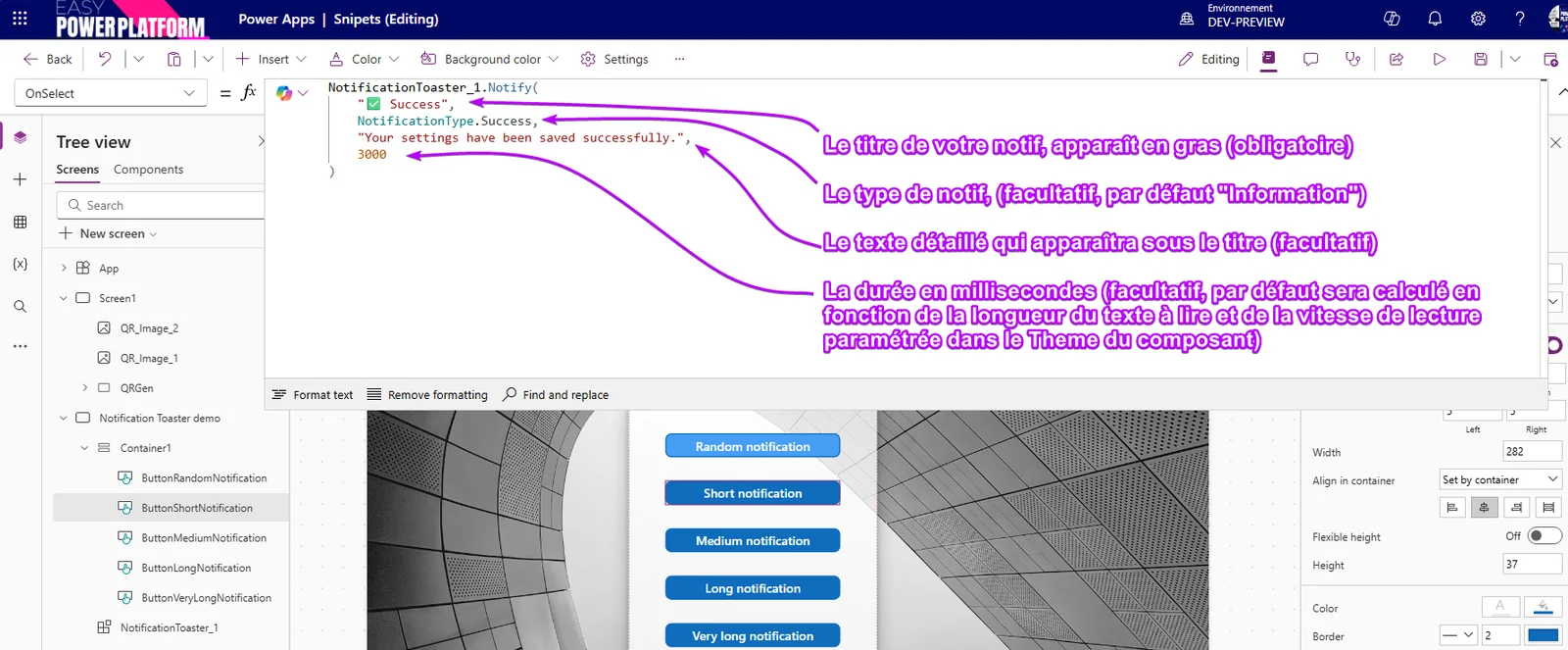
Pour que le composant apparaisse en bas à droite de votre écran, donnez lui les paramètres de position suivants :
x: Parent.Width-Self.Width
y: Parent.Height-Self.Height
Code
ComponentDefinitions:
  NotificationToaster:
    DefinitionType: CanvasComponent
    AccessAppScope: true
    CustomProperties:
      AutoHeight:
        PropertyKind: Output
        DisplayName: AutoHeight
        Description: A custom property
        DataType: Number
      Notify:
        PropertyKind: Action
        DisplayName: Notify
        Description: A custom property
        ReturnType: Table
        Parameters:
          - Title:
              Description: Notification title (bold)
              DataType: Text
              Default: =""
          - Type:
              Description: Notification type, use NotificationType.Succes .Error etc..
              IsOptional: true
              DataType: Number
              Default: =3
          - Text:
              Description: Detailled notification text
              IsOptional: true
              DataType: Text
              Default: =""
          - Duration:
              Description: A parameter
              IsOptional: true
              DataType: Number
              Default: =0
      Theme:
        PropertyKind: Input
        DisplayName: Theme
        Description: Theme & Colors used for notifications
        DataType: Record
        Default: |-
          =/*---------------- Instructions ------------------
          To Notify, use :

          NotificationToaster_1.Notify(                           //replace 'NotificationToaster_1' by the name of the component in your app screen
              "✅ Success",                                       // Mandatory : Title of your notification in bold text
              NotificationType.Success,                           // Optionnal : NotificationType.Information by default
              "Your settings have been saved successfully.",      // Optional : Detailled notifiction text
              3000                                                // Optionnal : The notification lifetime will be calculated based on the number of characters to be read and the 'ReadingSpeed' in the 'Theme' parameter

          Componnent positionning : To position the component in the bottom right corner of your screen, use the following positioning formulas:
          x: Parent.Width-Self.Width
          y: Parent.Height-Self.Height

          */
          {Transparency:"99", // in hexadecimal : from 00(transparent) to ff (opaque)
          FontSize:11,
          ReadingSpeed:23, // chars per second, used to calculate default notification duration
          SuccessTextColor:"#ffffff",
          SuccessBckgndColor:"#009944",
          ErrorTextColor:"#ffffff",
          ErrorBckgndColor:"#cf000f",
          WarningTextColor:"#ffffff",
          WarningBckgndColor:"#f0541e",
          InformationTextColor:"#000000",
          InformationBckgndColor:"#ffffff"
          }
      Timer:
        PropertyKind: Input
        DisplayName: Timer
        Description: You can desactivate the timer
        DataType: Boolean
        Default: =true
    Properties:
      AutoHeight: =Sum(GalleryNotifs.AllItems,HtmlTextNotif.Height) + (GalleryNotifs.AllItemsCount*10)+10
      ContentLanguage: ="" // YAML Snipet component by David Zoonekyndt https://dz13n.wordpress.com/
      Height: |-
        =// Adjusts the height according to the number of notifications without exceeding the screen height, do not modify
        Min(NotificationToaster.AutoHeight,App.ActiveScreen.Height)
      Notify: =Collect(colNotifications,{ID:Max(colNotifications,ID)+1,Title:Title,Text:Text, Type:Type, Duration:Duration})
      Width: =420
    Children:
      - GalleryNotifs:
          Control: Gallery@2.15.0
          Variant: VariableHeight
          Properties:
            AccessibleLabel: ="Notifications"
            Height: =Parent.Height
            ItemAccessibleLabel: |-
              =ThisItem.Title&".
              "&ThisItem.Text
            Items: =colNotifications
            ShowScrollbar: =false
            TabIndex: =0
            TemplatePadding: =0
            Width: =Parent.Width
          Children:
            - HtmlTextNotif:
                Control: HtmlViewer@2.1.0
                Properties:
                  AutoHeight: =true
                  Height: =203
                  HtmlText: |-
                    =$"<!DOCTYPE html>
                    <html lang='fr'>
                    <head>
                        <meta charset='UTF-8'>
                        <meta name='viewport' content='width=device-width, initial-scale=1.0'>
                        <title>Notification toaster</title>
                    </head>

                        <div class='notification' style='
                            /* --- Div styles --- */
                            position: relative;
                            overflow: hidden; /* Nécessaire pour couper la barre de progression aux bords arrondis */
                            width: 100%;
                            box-sizing: border-box;
                            color: {Switch(ThisItem.Type,NotificationType.Error,NotificationToaster.Theme.ErrorTextColor,NotificationType.Information,NotificationToaster.Theme.InformationTextColor,NotificationType.Success,NotificationToaster.Theme.SuccessTextColor,NotificationType.Warning,NotificationToaster.Theme.WarningTextColor,"#000000")};
                            border-radius: 16px;
                            border: 1px solid rgba(255, 255, 255, 0.3);
                            box-shadow: 3px 5px 3px rgba(0, 0, 0, 0.2);
                            margin-bottom: 5px;
                            padding: 20px;
                            padding-top: 25px;
                            padding-right: 35px;
                            backdrop-filter: blur(8px);
                            -webkit-backdrop-filter: blur(8px);

                            /* --- Glassmorphism --- */
                            /* 1. Fond semi-transparent : indispensable pour voir à travers. */
                            background: {Switch(ThisItem.Type,NotificationType.Error,NotificationToaster.Theme.ErrorBckgndColor,NotificationType.Information,NotificationToaster.Theme.InformationBckgndColor,NotificationType.Success,NotificationToaster.Theme.SuccessBckgndColor,NotificationType.Warning,NotificationToaster.Theme.WarningBckgndColor,"#ffffff")}{NotificationToaster.Theme.Transparency};

                        '>
                            <div class='progress-bar-container' style='
                                position: absolute;
                                top: 0;
                                left: 0;
                                width: 100%;
                                height: 4px;
                                background-color: rgba(255, 255, 255, 0.3);
                            '>{If(ThisItem.ID=First(colNotifications).ID /* Show progress bar only on 1st item */,$"
                            <div class='progress-bar-fill' style='
                                    height: 100%;
                                    width: {Text(IfError(TimerDeleteNotification.Value*100/TimerDeleteNotification.Duration,0),"0.00","en-US")}%; /* Force en-US to avoid comma separated decimals */
                                    background-color: {Switch(ThisItem.Type,NotificationType.Error,NotificationToaster.Theme.ErrorBckgndColor,NotificationType.Information,NotificationToaster.Theme.InformationBckgndColor,NotificationType.Success,NotificationToaster.Theme.SuccessBckgndColor,NotificationType.Warning,NotificationToaster.Theme.WarningBckgndColor,"#ffffff")};
                                    border-radius: 0 2px 2px 0;
                                '></div>")}
                            </div>
                            <p style='
                                font-weight: bold;
                                margin-top: 0;
                                margin-bottom: 8px;
                                font-size: 1.2em;
                            '>
                                {ThisItem.Title}
                            </p>
                            <p style='margin: 0;'>
                                {ThisItem.Text}
                            </p>
                        </div>

                    </body>
                    </html>"
                  OnSelect: =Select(Parent)
                  Size: =NotificationToaster.Theme.FontSize
                  Width: =Parent.TemplateWidth-Self.X*2
                  X: =5
            - ButtonRemoveNotif:
                Control: Button@0.0.45
                Properties:
                  AccessibleLabel: =$"button close notification {ThisItem.Title}"
                  Appearance: ='ButtonCanvas.Appearance'.Subtle
                  BasePaletteColor: =ColorValue(Switch(ThisItem.Type,NotificationType.Error,NotificationToaster.Theme.ErrorBckgndColor,NotificationType.Information,NotificationToaster.Theme.InformationBckgndColor,NotificationType.Success,NotificationToaster.Theme.SuccessBckgndColor,NotificationType.Warning,NotificationToaster.Theme.WarningBckgndColor,"#ffffff"))
                  FontColor: =ColorValue(Switch(ThisItem.Type,NotificationType.Error,NotificationToaster.Theme.ErrorTextColor,NotificationType.Information,NotificationToaster.Theme.InformationTextColor,NotificationType.Success,NotificationToaster.Theme.SuccessTextColor,NotificationType.Warning,NotificationToaster.Theme.WarningTextColor,"#ffffff"))
                  FontSize: =34
                  Height: =40
                  Icon: ="DismissCircle"
                  IconStyle: ='ButtonCanvas.IconStyle'.Filled
                  Layout: ='ButtonCanvas.Layout'.IconOnly
                  OnSelect: |-
                    =If(ThisItem.ID=First(colNotifications).ID && ThisItem.ID <> Blank() // To avoid timer from keeping last item value
                    , Set(vRemoveNotif,TimerDeleteNotification.Value) ,Remove(colNotifications,ThisItem))
                  Text: ="Remove"
                  Width: =40
                  X: =Parent.TemplateWidth-Self.Width-15
                  Y: =15
      - TimerDeleteNotification:
          Control: Timer@2.1.0
          Properties:
            AutoStart: =Parent.Timer
            Duration: |-
              =With({FirstNotif:First(colNotifications)},
              Coalesce(
                  vRemoveNotif,
                  If(FirstNotif.Duration=0,IfError((Len(FirstNotif.Title)+Len(FirstNotif.Text))/NotificationToaster.Theme.ReadingSpeed*1000,3500),FirstNotif.Duration))
              )
            OnSelect: =Collect(colNotifications,FirstN([{ID:1,Title:"",Text:"",Duration:1000}],0))
            OnTimerEnd: |-
              =Remove(colNotifications,First(colNotifications));
              Set(vRemoveNotif,Blank()) // To avoid timer from keeping last item value
            OnTimerStart: =UpdateIf(colNotifications,ID=Blank(),{ID:Max(colNotifications,ID)+1})
            Repeat: =Parent.Timer
            Reset: =//CountIf(colNotifications,ID=Blank())>0 || CountIf(colNotifications,ID=Blank())=0
            Start: =true
            TabIndex: =-1
            Visible: =false
            Y: =-50
      - Admin_ButtonRandomNotification:
          Control: Classic/Button@2.2.0
          Properties:
            OnSelect: |-
              =Collect(colNotifications,Switch(RandBetween(1,4),
                  1,{Title:"✅ Success",Text:"Your settings have been saved successfully.", Type:NotificationType.Success, Duration: 3000},
                  2,{Title:"❌ Payment Authorization Failed",Text:"We were unable to process your payment for order #855-24B. The authorization was declined by your bank, which can happen due to insufficient funds, an incorrect card number, or security limits set by your financial institution. Please double-check your payment details and try again. If the issue persists after verifying your information, we recommend contacting your bank directly for more details before attempting another transaction. We have saved your cart for your convenience.", Type:NotificationType.Error, Duration: 12000},
                  3,{Title:"⚠️ Session Expiring",Text:"Your session is about to expire due to inactivity. To protect your account, you will be logged out in two minutes. Please save any unsaved work now.", Type:NotificationType.Warning, Duration: 3000},
                  4,{Title:"ℹ️ New Feature Available",Text:"We're excited to announce the arrival of our new ""Project Templates"" feature! You can now create and save custom project layouts to streamline your workflow. To get started, simply navigate to the ""Projects"" tab and select ""Create from Template."" We hope this update helps you work more efficiently.", Type:NotificationType.Information, Duration: 8000}
                  )
              )
            TabIndex: =-1
            Text: ="Random Notify"
            X: =196
            Y: =-50
      - Admin_ButtonClear:
          Control: Classic/Button@2.2.0
          Properties:
            OnSelect: =Clear(colNotifications)
            TabIndex: =-1
            Text: ="Clear"
            X: =385
            Y: =-50
      - Accessible content:
          Control: Label@2.5.1
          Properties:
            Live: =Live.Assertive
            Size: =10
            Text: |-
              =If(!IsBlank(Last(colNotifications)),"New notification :"&Last(colNotifications).Title&".
              "&Last(colNotifications).Text)
            X: =10
            Y: =-100
L’écran de démonstration, (ajoutez le composant avant)
Screens:
  Notification Toaster demo:
    Properties:
      BackgroundImage: ="https://images.unsplash.com/photo-1558485694-21e9d4f2bd36?q=80&w=1548&auto=format&fit=crop&ixlib=rb-4.1.0&ixid=M3wxMjA3fDB8MHxwaG90by1wYWdlfHx8fGVufDB8fHx8fA%3D%3D"
      ImagePosition: =ImagePosition.Fill
    Children:
      - Container1:
          Control: GroupContainer@1.3.0
          Variant: AutoLayout
          Properties:
            DropShadow: =DropShadow.Bold
            Fill: =RGBA(255, 255, 255, 0.75)
            Height: =488
            LayoutAlignItems: =LayoutAlignItems.Center
            LayoutDirection: =LayoutDirection.Vertical
            LayoutGap: =40
            LayoutJustifyContent: =LayoutJustifyContent.Center
            RadiusBottomLeft: =20
            RadiusBottomRight: =20
            RadiusTopLeft: =20
            RadiusTopRight: =20
            Width: =404
            X: =424
            Y: =140
          Children:
            - ButtonRandomNotification:
                Control: Classic/Button@2.2.0
                Properties:
                  Fill: =App.Theme.Colors.Lighter20
                  Height: =37
                  OnSelect: |-
                    =Switch(RandBetween(1,4),
                        1,
                        Select(ButtonShortNotification),
                        2,
                        Select(ButtonMediumNotification),
                        3,
                        Select(ButtonLongNotification),
                        4,
                        Select(ButtonVeryLongNotification)
                        )
                  TabIndex: =-1
                  Text: ="Random notification"
                  Width: =282
                  X: =492
                  Y: =268
            - ButtonShortNotification:
                Control: Classic/Button@2.2.0
                Properties:
                  Height: =37
                  OnSelect: =NotificationToaster_1.Notify("✅ Success",NotificationType.Success,"Your settings have been saved successfully.",3000);
                  TabIndex: =-1
                  Text: ="Short notification"
                  Width: =282
                  X: =492
                  Y: =107
            - ButtonMediumNotification:
                Control: Classic/Button@2.2.0
                Properties:
                  Height: =37
                  OnSelect: =NotificationToaster_1.Notify("⚠️ Session Expiring",NotificationType.Warning,"Your session is about to expire due to inactivity. To protect your account, you will be logged out in two minutes. Please save any unsaved work now.")
                  TabIndex: =-1
                  Text: ="Medium notification"
                  Width: =282
                  X: =492
                  Y: =159
            - ButtonLongNotification:
                Control: Classic/Button@2.2.0
                Properties:
                  Height: =37
                  OnSelect: =NotificationToaster_1.Notify("ℹ️ New Feature Available", NotificationType.Information,"We're excited to announce the arrival of our new ""Project Templates"" feature! You can now create and save custom project layouts to streamline your workflow. To get started, simply navigate to the ""Projects"" tab and select ""Create from Template."" We hope this update helps you work more efficiently.")
                  TabIndex: =-1
                  Text: ="Long notification"
                  Width: =282
                  X: =492
                  Y: =211
            - ButtonVeryLongNotification:
                Control: Classic/Button@2.2.0
                Properties:
                  Height: =37
                  OnSelect: |-
                    =NotificationToaster_1.Notify("❌ Payment Authorization Failed action required immediatly", NotificationType.Error,"We were unable to process your payment for order #855-24B. The authorization was declined by your bank, which can happen due to insufficient funds, an incorrect card number, or security limits set by your financial institution. Please double-check your payment details and try again. If the issue persists after verifying your information, we recommend contacting your bank directly for more details before attempting another transaction. We have saved your cart for your convenience.")
                  TabIndex: =-1
                  Text: ="Very long notification"
                  Width: =282
                  X: =492
                  Y: =260
            - Timer_On_Off:
                Control: Toggle@1.1.5
                Properties:
                  AlignInContainer: =AlignInContainer.Center
                  Checked: =true
                  Label: ="Timer On / Off"
                  Width: =200
      - NotificationToaster_1:
          Control: CanvasComponent
          ComponentName: NotificationToaster
          Properties:
            ContentLanguage: ="" // YAML Snipet component by David Zoonekyndt https://dz13n.wordpress.com/
            Height: |-
              =// Adjusts the height according to the number of notifications without exceeding the screen height, do not modify
              Min(NotificationToaster_1.AutoHeight,App.ActiveScreen.Height)
            Theme: |-
              =/*---------------- Instructions ------------------
              To Notify, use :

              NotificationToaster_1.Notify(                           //replace 'NotificationToaster_1' by the name of the component in your app screen
                  "✅ Success",                                       // Mandatory : Title of your notification in bold text
                  NotificationType.Success,                           // Optionnal : NotificationType.Information by default
                  "Your settings have been saved successfully.",      // Optional : Detailled notifiction text
                  3000                                                // Optionnal : The notification lifetime will be calculated based on the number of characters to be read and the 'ReadingSpeed' in the 'Theme' parameter

              Componnent positionning : To position the component in the bottom right corner of your screen, use the following positioning formulas:
              x: Parent.Width-Self.Width
              y: Parent.Height-Self.Height

              */
              {Transparency:"99", // in hexadecimal : from 00(transparent) to ff (opaque)
              FontSize:11,
              ReadingSpeed:23, // chars per second, used to calculate default notification duration
              SuccessTextColor:"#ffffff",
              SuccessBckgndColor:"#009944",
              ErrorTextColor:"#ffffff",
              ErrorBckgndColor:"#cf000f",
              WarningTextColor:"#ffffff",
              WarningBckgndColor:"#f0541e",
              InformationTextColor:"#000000",
              InformationBckgndColor:"#ffffff"
              }
            Timer: =Timer_On_Off.Checked
            Width: =420
            X: =Parent.Width-Self.Width
            Y: =Parent.Height-Self.Height
Ce snippet fait partie de la collection Snippets YAML. Retrouvez tous les snippets avec le tag Snippet.
Échanger autour de cet article
Les commentaires utilisent Giscus et GitHub Discussions. Le service externe n’est contacté qu’après activation.